Tuesday, April 6, 2021

Aiwa CS 880E Schematic diagram, 3 band stereo radio casette recorder - description of the MD-3 mechanism – exploded view – vintage set


Aiwa CS 880E Schematic diagram, 3 band stereo radio cassette recorder– exploded view – Vintage set

Description of the MD-3 mechanism

With the plate button pressed, the trigger lever (PLAY ) moves in the direction of the arrow <- (1), the gear (PLAY ) is released from the boss of the trigger lever (PLAY ) engages with the gear flywheel and rotates in the direction of the arrow <- (2), the boss (A) of the gear (PLAY ) touches the trigger lever (PLAY ) and the gear stops rotating.

When the gear (PLAY ) rotates, the lever (PLAY ) moves in the direction of the arrow <- (3) along the cam groove on the rear of the gear to push up the operation chassis in the direction of the arrow «- (4).  The PLAY button which has been locked is released by pressing the STOP button, the trigger lever (PLAY ) moves in the direction of the arrow *- (5), the boss (A) of the gear (PLAY ) is released and the PLAY operation stops.


Description of the FF Operation
When the FF button is pressed, the trigger lever FF moves in the direction of the arrow (1), the boss of the gear FR cam is released and engages with the gear wheel to rotate in the direction of the arrow. <- (2), the boss (A ) touches the boss of the trigger lever FF and the gear FR cam stops. The FR lever B moves in the direction of the arrow «- (3) along the groove of the gear FR cam, the FR lever B moves in the direction of the arrow <- (3), the FR lever C compresses the gear of the FR lever Ass'y against the Take-up
reel disc ass'y to perform the FF operation.


REW Operation
When the REW button is pressed, the trigger lever REW moves in the direction of the arrow <- (1) and pushes the lever REW in the direction of the arrow <- (2). The trigger lever FF releases the boss A of the gear at that time, the gear FR engages with the gear flywheel, rotates in the direction of the arrow <- (3), boss B touches the trigger lever FF and rotation stops.  The FR gear B is moved in the direction the arrow «- (4) by means of the cam of the gear FR following the rotation of the gear FR , pulls the FR lever C in the direction of the arrow «- (5) and moves the FR lever ass'y in the direction of the arrow <- (6) to rotate the Take-up reel disc reel disc ass'y to perform the R E W operation.


Description of the PAUSE Operation
When the PAUSE button is pressed, the trigger lever PAUSE moves in the direction o f the arrow *- (1), the boss A of the gear PA U SE is released, engages with the gear flywheel and rotates in the direction of the arrow <- (2), the boss B touches the trigger PAUSE and rotation stops.  The PAUSE lever moves in the direction of the arrow •*- (3) along the cam groove of the PAUSE gear at that time. The PLAY idler lever and the pinch lever ass'y is moved to perform the PAUSE operation at that time.
When the PAUSE button is pressed again, the button is released from locking and simultaneously the boss B of the gear PAUSE is released from the trigger lever PAUSE and the PAUSE operation is released.


REC Operation
When the REC and PLAY buttons are pressed simultaneously, the trigger lever REC moves in the direction of the arrow +- (1 ).  The PLAY operation is performed simultaneously at that time, so the REC lever driver moves in the direction of the arrow «- (2),
pushes the lever RECA, B in the direction of the arrow <- (3), the interlocked slide REC plate pulls the rod, the slide switch is operated and the unit enters the R E C mode.  When one of the STOP, FF and REW buttons is pressed, the REC trigger lever is released from the REC lever driver and only the REC operation is released.


Description of the Auto-stop Operation
The motor rotation is transmitted to the gear auto-kick of the MD-3 mechanism via the slip pulley FR ass'y.  The slip disk presses the lever auto A in the direction of the arrow <- (1) when the Take-up reel disc ass'y is rotating, so the boss of the lever auto A moves along the cam (A) groove of the gear auto-kick.  When the reel discs (S, T sides) stop, the lever auto A stops in the condition being moves in the direction of the arrow (2).  The cam (B) of the gear auto-kick moves the lever auto A in the direction of the arrow «- (3), operates the plate auto-kick in the direction of the arrow «- (4) to release the plate lock and performs the AUTO STOP operation.


Spring application position


Exploded view


Schematic diagram


Sunday, March 21, 2021

RQ-92 National-Panasonic Double Cassette Recorder schematic (Circuit Diagram)

 National/Panasonic RQ92 cassette recorder circuit diagram

Used ICs: AN6552, MN3007, BA3702, TA7240AP


Tuesday, March 9, 2021

Admiral Color TV schematic (Vintage TV)-Chassis K10 – Hybrid (using transistors and vacuum tubes) -1974 model

 (Hybrid) color TV - Admiral Chassis K10 - Vintage TV - 1974.  Spare component availability will be rare.  Just compare this with modern TV circuits, and feel how much the field of electronics have developed.  There was no integrated circuit (ICs) at that time. 

 The circuit consists of both tubes and transistors (Hybrid type). Tubes are used at its horizontal output and video output stage circuit. Most of these tubes are not available now.  Moreover the circuit boards are  dangerous to handle,  due to very high voltages  present on them,  while the set works. The picture tube is a Shadow Mask type,  need very high voltage,  in the range between 27 KV to 30KV, and have more than 33 alignment points.

 More to say,  these sets are very costlier at that time,  only very rich ones can afford it.  Actually, luxurious piece at that time  too. 

 This was the time, that I entered into this field  of electronics as a professional service technician. I'm 71 now,  and still continues. 

Layout – PWB

Schematic - Full

Circuit diagram-Split


Friday, March 5, 2021

Thomson Stereo Amplifier - DVD player DPL923VD, DPL933VD, DPL943W schematic diagram


Nominal output power:  4 x 50W:  2 x 100W

CONTROL / DISPLAY SCHEMATIC DIAGRAM

PT6315, HRM557BC5109, HT48R05


MAIN SCHEMATIC DIAGRAM: 1 OF 3

STA308A, STA515, BA4558F


MAIN SCHEMATIC: 2 OF 3

ES6603SF, BA5954FP, CS5340-C7, BA6289F, SN74AHC1GOBDBV, ES6698FD, M29W160ET70NG


MAIN SCHEMATIC: 3 0F 3

BU4052BF


MEMORY CARD READER SCHEMATIC DIAGRAM

GL816, 74VHC125M, 74LCX138M, 74LVX74MTR, CFCARD4312-23xxx


POWER SUPPLY [SMPS] SCHEMATIC DIAGRAM

L6565, VIPer53


Tuesday, February 23, 2021

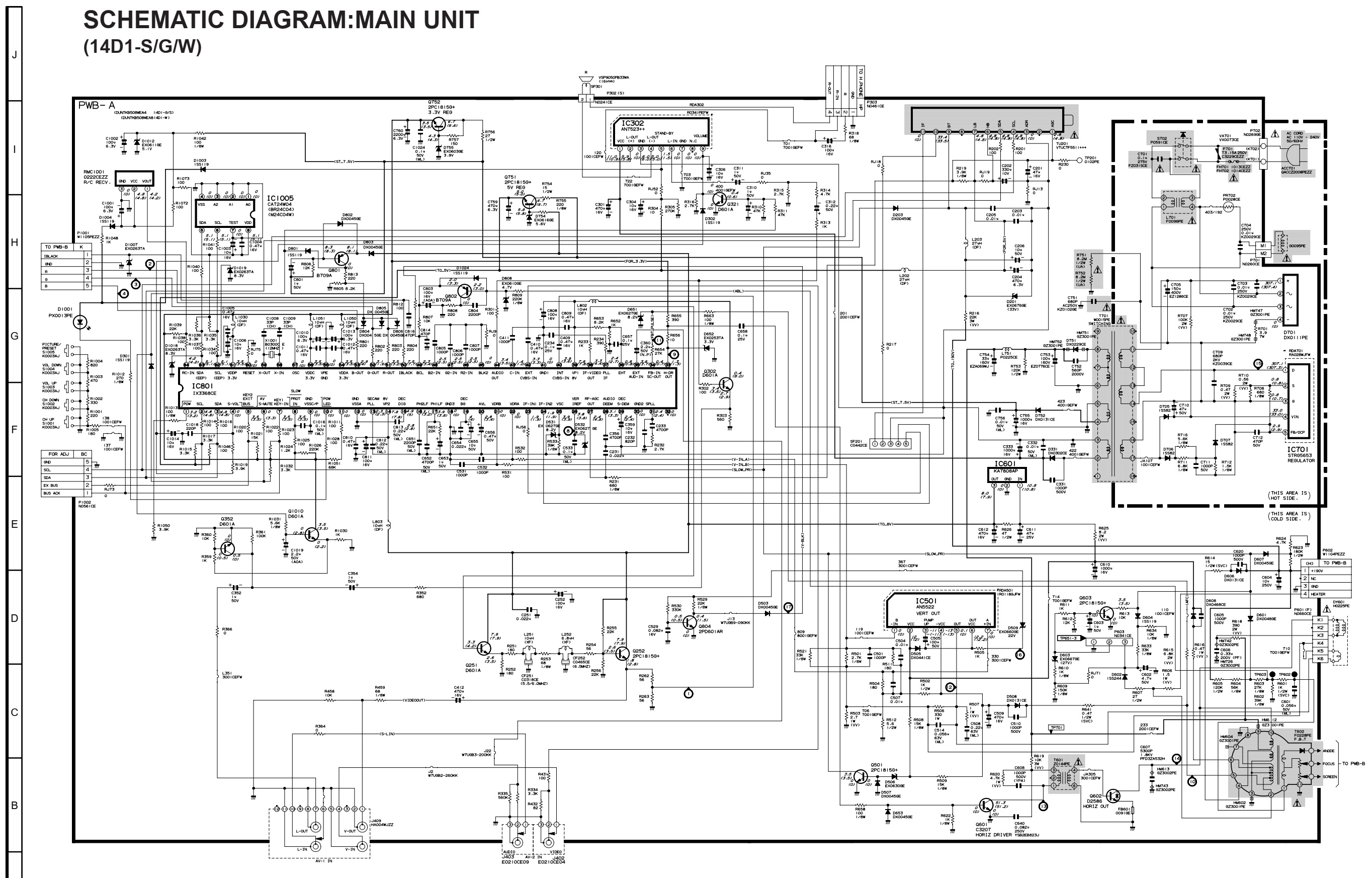
Sharp 14D1 and 14D2 Service mode, service adjustments, Hotel mode, Schematic diagram


Sharp 14D1-S/G/W and 14D2-S/G - 18 system color television

Service mode and adjustments

This model's setting are adjusted in two different ways: through the I2C bus control and in the conventional analog manner. The adjustments via the I2C bus control include preset-only items and variable data.  

CAUTION: Make sure TV Set is in "Normal Condition" before switch to Service Mode for adjustment.

Setting the service mode by the microprocessor

Short JA 137 & JA 138 for 1 second and release to switch to the service mode position, and the microprocessor is in input mode. (Adjustment through the I2C bus control). (Use JWS Key to set as well).

Press the CH DOWN / UP key on the remote controller to get ready to select the mode one by one.

Press the CH DOWN / UP key on the remote controller to select the modes reversibly one by one.

Using the VOLUME UP/ DOWN key on the remote controller, the data can be modified.

Short JA 137 & JA 138 for 1 second and release to switch to the normal mode (OFF) position, and the microprocessor is in out of the service mode.

Factory Presetting.

Short JA 137 & JA 138 then turn "ON" the main power and release to switch to the Service Mode position.Initial values are automatically preset, only when a new EEPROM is used (Judge with the first 4 bytes )

The initial data are preset as listed here.

Make sure the data need modify or not (Initial data).

Note: Once the chassis has been assembled together and ready to be POWER ON for the FIRST TIME, make sure to short JA137 & JA138 to switch to the service mode position first and then turn on the main power switch.

If haven't done this initiation, it may possibly generate excessive Beam current.

AFTER SHORT JA 137 & JA 138 ,AND TURN ON THE MAIN POWER SWITCH,READ DATA FROM EEPROM ADDRESS 00H ~ 03H,AND COMPARE TO THE LIST BELOW, IF DIFFERENT, INITIALIZE THE EEPROM.


Direct Key-in for Service Item in Service Mode


INITIAL SETTING

In service mode, After execute select POS 1, store the following tuning data in E2PROM.
Note: All sound system of following channels will be set to B/G or I after pressing INITIAL KEY 2, 3 or 4.


Shipping setting and checking


GA1 Hotel mode application

How to enable or disable the hotel mode.

Press the R/C [function] (1) key until language selection appear, withing five second press the [one/two digit] {2} key and keep pressing it for five second, then you can cee the hotel mode with four digits password.

Key in the four digit password number 1,3,7,9, then the hotel mode will be enabled, and you can switch on/off the hotel mode by using R/C [volume up/ volume Dn {3} key.

It is recommended before set the hotel mode, is better to chose ch1 & set S-Vol level up to 75% full scale.  After set hotel mode, starting channel will be always ch-1 and maximum sound out will be set the half of the full scale.

If you set hotel mode in AV, starting channel will be the last channel which you received before power off [same as normal operation.

Condition

When using the hotel mode, user can cantrol contrast, brightness, sharpness and tint function.

You can’t use:

Preset mode

Fine tuning

Skip mode

System selection

The other function is allowed to be used.

SCHEMATIC DIAGRAM:CRT UNIT and SCHEMATIC DIAGRAM:HEADPHONE UNIT


SCHEMATIC DIAGRAM:MAIN UNIT (14D1-S/G/W)


SCHEMATIC DIAGRAM:MAIN UNIT (14D2-S/G)


PWB


Saturday, February 20, 2021

CCE A-650 - LOGIC DECK-TUNER-DVD player 1000watts PMPO - Schematic


Display section schematic

Head preamp section schematic

Digital processor section schematic

Main amplifier section schematic

Sunday, February 14, 2021

Philips 39PFL5046, Philips 42PFL3300 and Philips 32PFL3200 LCD TVs – Power supply (SMPS) schematic diagrams

 Philips 32PFL3200 POWER SUPPLY (SMPS) Schematic diagram – 715G4831

Philips 42PFL3300 POWER SUPPLY (SMPS) Schematic diagram – 715G4922

715G3936 & 715G3967

Philips 39PFL5046 POWER SUPPLY (SMPS) Schematic diagram